

WooCommerce SEO helps ecommerce stores improve their visibility in search engines and reach potential customers who are actively searching for products online.
When a WooCommerce store is optimized effectively, search engines can understand its product pages, categories, and overall structure more clearly, which increases the chances of appearing in relevant search results. This improved visibility helps attract targeted traffic and creates more opportunities for sales.
However, optimizing an ecommerce store involves more than simply adding keywords to pages. It requires proper site structure, well-written product content, technical optimization, and a strong user experience.
Many businesses work with experienced SEO specialists who understand ecommerce search behavior and can implement strategies that improve rankings and product discoverability. With the right approach, WooCommerce stores can build consistent organic traffic and strengthen their long-term online growth.
Why WooCommerce SEO Is Important
The importance of optimizing a WooCommerce store for search engines goes beyond simply improving rankings. Proper optimization strengthens the entire ecommerce ecosystem by increasing visibility, improving usability, and supporting long-term growth. The key benefits are explained below.
1. Increase Organic Traffic to Your Store
Search engines are one of the most powerful sources of traffic for ecommerce websites. When a WooCommerce store is optimized properly, it appears for relevant product searches, category queries, and informational keywords. This helps attract visitors who are already interested in purchasing, making organic search traffic highly valuable for online stores.
2. Improve Product Visibility in Search Results
Product pages compete with thousands of similar listings across the internet. Effective search optimization ensures product titles, descriptions, and images are structured in a way that search engines understand. As a result, individual products have a better chance of appearing in search results when potential buyers look for specific items.
3. Enhance User Experience and Site Navigation
Search optimization is closely connected to usability. Clear site structure, logical categories, and well-organized product pages make it easier for visitors to find what they need. When users can navigate a store smoothly and quickly locate products, they tend to stay longer and engage more with the website.
4. Drive Higher Conversions and Sales
Visitors arriving through search engines are often closer to making a purchase decision. When product pages provide useful information, optimized images, and easy navigation, users are more likely to complete a purchase. Strong optimization therefore helps convert traffic into actual sales.
5. Support Long-Term Ecommerce Growth
Unlike paid advertising that stops delivering results when campaigns end, search engine traffic continues to grow over time with consistent optimization. A well-optimized WooCommerce store builds authority, gains backlinks, and gradually improves search rankings, supporting sustainable long-term ecommerce growth.
WooCommerce SEO Strategies
Improving search visibility requires a combination of content optimization, technical improvements, and strong site architecture. The following WooCommerce SEO strategies help ecommerce businesses improve rankings, attract qualified traffic, and enhance store performance.
1. Keyword Research for Product Pages
Effective optimization begins with proper keyword research. Understanding how potential customers search for products allows store owners to optimize product pages and categories accordingly.
Product Keywords
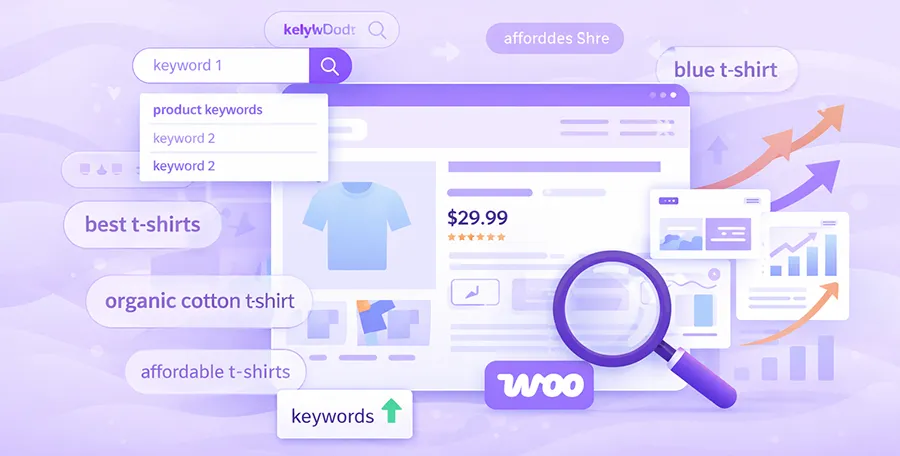
Product keywords represent the exact terms customers use when searching for specific items. These keywords typically include product names, models, or types. Including these terms naturally in titles, descriptions, and product details helps search engines match the store’s pages with relevant search queries.
Long-Tail Keywords
Long-tail keywords are more specific search phrases that often contain three or more words. Although these keywords may have lower search volume, they tend to attract highly targeted visitors. For example, instead of searching for a general product category, users might search for a specific feature or variation.
Buyer Intent Keywords
Buyer intent keywords indicate that a user is close to making a purchase decision. Words like “buy,” “best,” “discount,” or “compare” often signal commercial intent. Targeting these terms on product pages and category pages helps capture users who are ready to convert.
Category-Level Keywords
Category pages should also target broader keywords that represent groups of products. These keywords help the store appear in searches for general product types and allow users to explore multiple items within a category.
2. Optimize Product Pages
Product pages are the foundation of ecommerce search optimization. Each page must be structured carefully to provide both useful information for customers and clear signals for search engines.
SEO-Friendly Product Titles
Product titles should clearly describe the item while including relevant keywords naturally. Titles that combine product names with key features help both search engines and customers understand what the product offers.
Unique Product Descriptions
Many ecommerce stores rely on manufacturer descriptions, which often leads to duplicate content across multiple websites. Creating unique descriptions helps search engines differentiate the page and improves its chances of ranking higher.
Optimized Product Images and Alt Text
Images play a major role in ecommerce stores. Optimizing images includes compressing file sizes for faster loading and adding descriptive alt text. Alt text helps search engines understand what the image represents and can improve visibility in image search results.
Product Reviews and Ratings
User-generated content such as reviews and ratings adds credibility to product pages. Search engines also recognize this content as a sign of active engagement, which can strengthen the overall authority of the page.
Structured Product Information
Providing structured product details such as specifications, features, and benefits improves readability and helps users make informed decisions. Well-organized information also allows search engines to interpret the content more effectively.
3. Optimize Category Pages
Category pages serve as key entry points for many ecommerce visitors. Proper optimization helps these pages rank for broader product searches.
Category Descriptions
Adding detailed descriptions to category pages provides context about the products offered in that section. These descriptions can include relevant keywords while explaining the types of items available.
Keyword Optimization
Each category page should target a primary keyword related to the products in that category. Supporting terms can be included naturally within the description to strengthen relevance.
Internal Linking to Products
Linking category pages to individual product listings improves navigation and distributes link authority across the site. This structure helps search engines discover and index product pages more efficiently.
Proper Category Hierarchy
A clear hierarchy ensures that products are organized logically. Main categories should represent broad product groups, while subcategories provide more specific organization.
4. Improve WooCommerce Site Structure
A well-organized website structure makes it easier for both users and search engines to navigate the store. This is a core element of any effective WooCommerce SEO guide.
Clear Navigation and Menus
Navigation menus should be simple, intuitive, and organized around key product categories. Visitors should be able to reach important pages within a few clicks.
SEO-Friendly URLs
URLs should be short, descriptive, and include relevant keywords. Clean URLs help search engines understand page content and make links easier for users to read.
Breadcrumb Navigation
Breadcrumbs display the path from the homepage to the current page. This feature improves navigation and provides additional context for search engines.
Logical Product Categorization
Products should always belong to the most relevant categories and subcategories. Logical categorization ensures users can easily find related products.
5. Technical SEO for WooCommerce
Technical optimization ensures that search engines can crawl, index, and interpret the website effectively. Following the right WooCommerce SEO tips helps maintain a technically sound store.
XML Sitemaps
XML sitemaps provide search engines with a list of important pages on the website. Submitting sitemaps helps search engines discover product pages more efficiently.
Robots.txt Optimization
The robots.txt file controls which parts of the website search engines can access. Proper configuration prevents unnecessary pages from being crawled while prioritizing important content.
Schema Markup for Products
Structured data markup helps search engines understand product information such as price, availability, and ratings. This can enhance search listings with rich results.
Fixing Duplicate Content
Duplicate content can occur due to filters, tags, or product variations. Implementing canonical tags and proper URL structures helps prevent indexing issues.
6. Improve Page Speed
Page speed directly affects both user experience and search rankings. Faster websites keep visitors engaged and reduce bounce rates.
Image Optimization
Large images can significantly slow down a website. Compressing images without sacrificing quality improves loading speed and overall performance.
Caching
Caching stores certain website elements temporarily, allowing pages to load faster for returning visitors. This reduces server load and improves browsing speed.
Lightweight Themes
Choosing a lightweight WooCommerce theme ensures that unnecessary code does not slow down the website. Efficient themes contribute to better performance and faster loading.
Optimized Hosting
Reliable hosting infrastructure plays a major role in website speed. Servers designed for WooCommerce stores often deliver better performance and stability.
7. Mobile Optimization
A significant portion of ecommerce traffic comes from mobile devices. Mobile optimization ensures the store performs well on smartphones and tablets.
Responsive Design
Responsive design allows the website layout to adapt automatically to different screen sizes. This ensures users have a consistent experience across devices.
Mobile-Friendly Navigation
Menus and navigation elements must be easy to use on smaller screens. Clear buttons and simplified menus improve usability for mobile visitors.
Faster Mobile Loading Speed
Mobile users expect fast-loading pages. Optimizing images, scripts, and caching helps reduce loading time and improve the mobile experience.
8. Build High-Quality Backlinks
Backlinks remain an important ranking factor in search engine optimization. They signal authority and trustworthiness to search engines.
Guest Blogging
Publishing articles on relevant industry blogs allows businesses to reach new audiences while earning valuable backlinks to their store.
Product Reviews
Collaborating with bloggers or influencers who review products can generate high-quality links and bring targeted visitors to the store.
Industry Partnerships
Working with complementary businesses can lead to mutual promotions, collaborations, and backlinks that strengthen search visibility.
Content Marketing
Creating useful guides, tutorials, or product comparison articles attracts organic links from other websites. These links help build long-term authority.
9. Optimize Internal Linking
Internal linking helps search engines understand the relationship between pages while guiding visitors to relevant products and categories. A well-planned internal linking structure distributes authority across the site and improves discoverability.
Link between related products
Adding links to related or complementary products encourages users to explore more items within the store. This improves engagement and helps search engines crawl product pages more efficiently.
Link from blog content to products
Blog posts, buying guides, and informational articles can naturally link to relevant product pages. These contextual links drive targeted traffic and strengthen the connection between informational and commercial content.
Use descriptive anchor text
Anchor text should clearly describe the page being linked to. Using relevant keywords within anchor text helps search engines understand the topic of the destination page.
Highlight important pages
High-priority pages such as top product categories, best-selling products, or seasonal collections should receive more internal links to strengthen their authority within the store.
10. Create SEO-Friendly Content for WooCommerce
Content marketing supports ecommerce optimization by attracting informational search traffic and guiding potential customers toward products. Well-written content can increase visibility and build trust with users.
Buying guides and product comparisons
Creating detailed buying guides helps customers understand product features and choose the right option. These guides can target informational search queries while linking to relevant products.
Educational blog content
Publishing helpful articles related to the store’s niche builds authority and attracts organic traffic. Educational content can answer common customer questions and introduce visitors to the store’s products.
Product usage tips and tutorials
Tutorials explaining how to use products or maximize their benefits can attract users searching for solutions. These articles also create opportunities to recommend related products.
Evergreen content for long-term traffic
Evergreen articles remain useful for long periods and continue to attract search traffic. Topics such as product care, maintenance, or general buying advice can generate consistent visitors over time.
WooCommerce SEO Plugins
Plugins can simplify many optimization tasks and help store owners implement best practices efficiently. Since WooCommerce operates on the WordPress platform, store owners can access a wide range of SEO plugins designed specifically to improve search performance. The following tools play an important role in a practical WooCommerce SEO guide.
1. Rank Math SEO
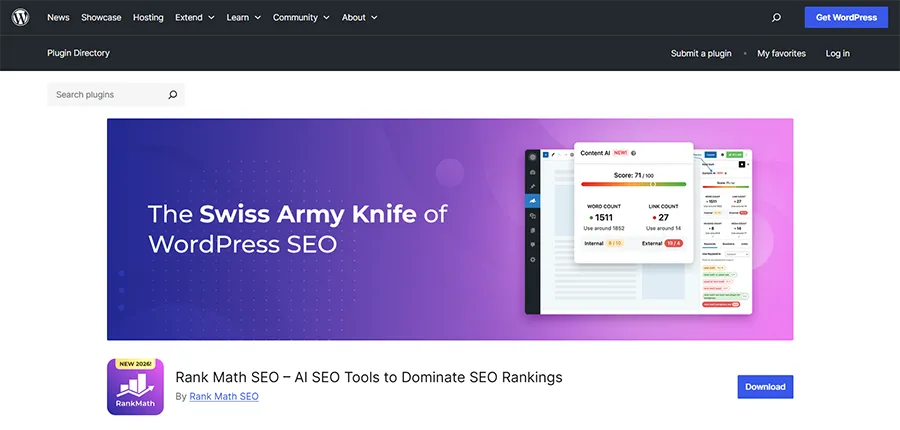
Rank Math SEO provides advanced optimization features including keyword analysis, schema support, and on-page recommendations. It integrates smoothly with WooCommerce and helps store owners optimize product pages efficiently.
2. Yoast SEO
Yoast SEO is one of the most widely used optimization plugins. It helps manage meta titles, descriptions, readability analysis, and XML sitemaps while supporting ecommerce product optimization.
3. All in One SEO (AIOSEO)
All in One SEO offers a comprehensive toolkit for optimizing ecommerce websites. It includes features for schema markup, sitemap management, and on-page analysis tailored for WooCommerce stores.
4. SEOPress
SEOPress is a lightweight yet powerful optimization plugin. It supports structured data, redirects, XML sitemaps, and content analysis while maintaining strong performance for ecommerce websites.
5. Squirrly SEO
Squirrly SEO focuses on real-time optimization suggestions. It guides store owners through keyword placement, content improvements, and technical enhancements that help improve search visibility.
Summary of WooCommerce SEO
Search engine optimization is essential for any ecommerce store that wants to grow organically and reach customers through search engines. From keyword research and product page optimization to technical improvements and backlink building, every aspect of the store contributes to better search performance.
By implementing effective WooCommerce SEO strategies, optimizing product and category pages, improving site speed, and ensuring mobile usability, store owners can create a well-structured and search-friendly website. Plugins further simplify the process by automating many optimization tasks and providing helpful recommendations.
Ultimately, consistent WooCommerce SEO efforts lead to better search visibility, stronger user experience, and improved ecommerce performance over time. By leveraging the flexibility of WordPress and the available optimization tools, store owners can continuously improve their online store’s search performance and long-term growth.