

Building a website is only the first step, and without proper WordPress SEO, even the most well-designed site can struggle to attract visitors. Search engine optimization, or SEO, is the process of improving your website so that search engines like Google can understand, index, and rank your content effectively. When done correctly, SEO helps your site appear higher in search results, making it easier for potential readers, customers, or clients to find you.
For WordPress users, the good news is that the platform is naturally SEO-friendly. However, simply installing WordPress is not enough. You need to apply the right strategies, tools, and techniques to unlock its full potential. This WordPress SEO guide will walk you through beginner-friendly tips, explain the benefits of optimizing your site, and highlight the best WordPress SEO plugins that can help you rank higher.
Whether you manage a blog, business website, or online store, these strategies can deliver long-term growth. And if your needs become more advanced, partnering with professional WordPress SEO experts can further accelerate your success.
Key Benefits of WordPress SEO
Optimizing your website is not just about rankings. It directly impacts traffic, user engagement, credibility, and long-term marketing success. Below are the key benefits of implementing strong WordPress SEO best practices.
1. Higher Search Engine Rankings
When your content, structure, and technical elements are optimized, search engines can better understand your website. Proper keyword usage, clean URLs, structured headings, and optimized metadata signal relevance to search engines.
Higher rankings mean your website appears closer to the top of search results. Since most users rarely go beyond the first page, better visibility significantly increases the likelihood of clicks and engagement.
2. Increased Website Traffic
SEO focuses on attracting organic traffic, which means visitors come to your site naturally through search engines rather than paid advertisements.
These visitors are often highly targeted because they are actively searching for specific information, services, or products. As a result, SEO-driven traffic tends to convert better compared to random or untargeted sources.

3. Enhanced User Experience
A well-optimized WordPress site is typically fast, mobile-friendly, and easy to navigate. SEO improvements often align with usability improvements.
When users find your site easy to read and navigate, they stay longer, view more pages, and engage more deeply. These positive signals can further improve search rankings over time.
4. Cost-Effective Marketing
Unlike paid advertising campaigns that stop generating traffic once your budget runs out, SEO delivers long-term value.
Once your pages rank well, they can continue attracting traffic for months or even years with minimal ongoing investment. This makes SEO one of the most cost-effective digital marketing strategies available.
5. Improved Credibility and Trust
Users tend to trust websites that appear at the top of search results. High rankings create an impression of authority and reliability.
When your content is well-structured, informative, and helpful, it reinforces your expertise. Over time, this builds brand trust and strengthens your reputation in your industry.
WordPress SEO Tips for Beginners
This section forms the core of our WordPress SEO guide. These beginner-friendly strategies will help you build a strong foundation and improve your rankings step by step.
1. Optimize Your Content for Keywords
Keyword optimization is the process of aligning your content with the actual language your audience uses when searching. Search engines evaluate content relevance based on keyword signals, context, and search intent. If your content does not clearly reflect what users are searching for, it will struggle to rank regardless of quality.
In WordPress, keyword optimization affects multiple on-page elements, including titles, URLs, headings, and metadata. The goal is not repetition, but clarity of topic.
- Conduct keyword research: Identify search terms with consistent volume and achievable competition using tools like Google Keyword Planner or Ubersuggest.
- Define search intent before writing: Determine whether users want information, comparison, or transactional content.
- Target one primary keyword per page: Keep topical focus clear to avoid diluting ranking signals.
- Place keywords in strategic locations: Include the primary term in the title tag, first paragraph, one subheading, meta description, and URL slug.
- Use related phrases naturally: Strengthen contextual understanding by including synonyms and semantically related terms.
When keyword targeting aligns with user intent and content depth, search engines interpret the page as highly relevant, increasing ranking potential.
2. Structure Your Site for SEO
Website structure influences how search engines crawl and interpret relationships between pages. A disorganized structure weakens authority flow and makes indexing less efficient.
In WordPress, structure is controlled through categories, menus, internal linking, and URL hierarchy. A clear structure signals topical authority and helps distribute ranking strength across pages.
- Create logical content categories: Group related topics under defined sections to form a hierarchy.
- Maintain clean URL structures: Use descriptive slugs that reflect the page topic clearly.
- Use internal linking consistently: Connect related articles to guide both users and search engine crawlers.
- Implement breadcrumb navigation: Help search engines understand page hierarchy.
- Keep key pages easily accessible: Ensure important content is reachable within a few clicks.
A well-structured site improves crawl efficiency, strengthens topical depth, and enhances user navigation.
3. Improve Website Speed
Website speed directly impacts user behavior and ranking signals. Search engines prioritize fast-loading pages because they improve user satisfaction and reduce bounce rates.
In WordPress, performance depends on hosting quality, theme efficiency, image size, and plugin management. Speed optimization must address all these areas.
- Use caching plugins: Enable tools like WP Rocket or W3 Total Cache to reduce server processing time.
- Compress media files: Optimize images with tools such as Smush or ShortPixel before or during upload.
- Select performance-optimized themes: Choose lightweight themes designed for speed.
- Reduce unnecessary plugins: Remove inactive or heavy plugins that increase script load.
- Upgrade hosting if required: Use reliable hosting with strong server response times.
Faster websites improve engagement metrics, which indirectly strengthens overall SEO performance.
4. Mobile Optimization
Mobile-first indexing means search engines evaluate the mobile version of your site first. A poor mobile experience can significantly lower rankings.
Mobile optimization involves responsive design, usability adjustments, and performance tuning.
- Use responsive WordPress themes: Ensure layouts automatically adapt to different screen sizes.
- Test mobile usability regularly: Identify spacing, readability, and interaction issues.
- Optimize touch interactions: Ensure buttons are properly sized and spaced for easy tapping.
- Improve mobile load speed: Compress images and minimize scripts for smaller devices.
- Avoid intrusive pop-ups on mobile: Prevent interruptions that harm user experience.
A seamless mobile experience increases retention, engagement, and ranking stability.

5. Optimize On-Page SEO
On-page SEO strengthens how individual pages communicate relevance and authority to search engines. It ensures structural clarity and optimized metadata.
In WordPress, on-page improvements are easy to implement but require attention to detail.
- Craft keyword-focused title tags: Write clear titles that reflect the core topic and encourage clicks.
- Write persuasive meta descriptions: Summarize page value while reinforcing keyword relevance.
- Use structured headings correctly: Apply H1 for the main title and H2 or H3 for subsections.
- Add contextual internal links: Guide readers to related content within your site.
- Optimize image alt text: Provide descriptive alternative text for accessibility and indexing.
Strong on-page signals clarify topical authority and improve click-through rates from search results.
6. Use Schema Markup
Schema markup adds structured data that helps search engines interpret content meaning more precisely. It enhances how pages appear in search results through rich snippets.
WordPress users can implement schema using SEO plugins without coding.
- Add article schema to blog posts: Help search engines classify content correctly.
- Implement product schema for e-commerce: Display price, availability, and reviews in search results.
- Use FAQ schema for informational pages: Enable expandable question listings.
- Add review schema when applicable: Showcase ratings to improve credibility.
- Validate structured data regularly: Ensure schema is correctly implemented without errors.
Schema increases visibility in search results and can significantly improve click-through rates.
7. Improve User Experience
User experience influences behavioral signals such as dwell time and bounce rate. Search engines interpret these signals when assessing content quality.
A well-designed WordPress site encourages deeper interaction and longer sessions.
- Use readable typography and spacing: Improve comfort and reduce visual strain.
- Break content into clear sections: Improve scannability with structured formatting.
- Simplify navigation menus: Make important pages easy to find.
- Reduce visual clutter: Avoid excessive advertisements and distractions.
- Maintain consistent design elements: Provide a cohesive browsing experience.
Positive engagement metrics reinforce search engine trust and ranking strength.
8. Create a Content Strategy
SEO growth depends on consistent publishing and topical authority development. A structured content strategy ensures long-term relevance.
In WordPress, strategic planning prevents content gaps and strengthens thematic depth.
- Develop a publishing calendar: Maintain consistent posting frequency.
- Target related topic clusters: Cover subtopics comprehensively around main themes.
- Prioritize depth over quantity: Publish well-researched, long-form content when appropriate.
- Update outdated posts regularly: Refresh statistics and improve formatting.
- Analyze competitor content gaps: Identify opportunities for better coverage.
A strong content strategy builds authority and strengthens domain-wide ranking potential.
9. Implement Technical SEO Strategies
Technical SEO ensures search engines can crawl, index, and interpret your site without obstacles. Even excellent content cannot rank if technical barriers exist.
WordPress makes technical improvements manageable with proper configuration.
- Generate and submit XML sitemaps: Help search engines discover all important pages.
- Fix crawl errors and broken links: Maintain clean navigation and indexing health.
- Install and maintain SSL certificates: Secure your site with HTTPS.
- Use canonical tags correctly: Prevent duplicate content conflicts.
- Optimize robots.txt settings: Control crawler access strategically.
Strong technical foundations protect and amplify all other SEO efforts.
10. Track Performance and Adjust
SEO is an ongoing process that requires analysis and refinement. Without performance tracking, optimization becomes guesswork.
Monitoring allows you to understand ranking trends, engagement patterns, and growth opportunities.
- Use analytics platforms: Monitor traffic sources, session duration, and conversion data.
- Track keyword rankings regularly: Identify upward or downward movement in search positions.
- Analyze high-performing pages: Determine why certain content ranks better.
- Improve underperforming pages strategically: Expand content, refine keywords, and strengthen internal linking.
- Adjust strategy based on measurable data: Make improvements guided by evidence rather than assumptions.
Continuous analysis ensures your WordPress SEO efforts remain aligned with search algorithm changes and user behavior trends.
Essential WordPress SEO Plugins
Plugins simplify the optimization process and automate many technical tasks. Here are some of the best WordPress SEO tools to consider:
Yoast SEO
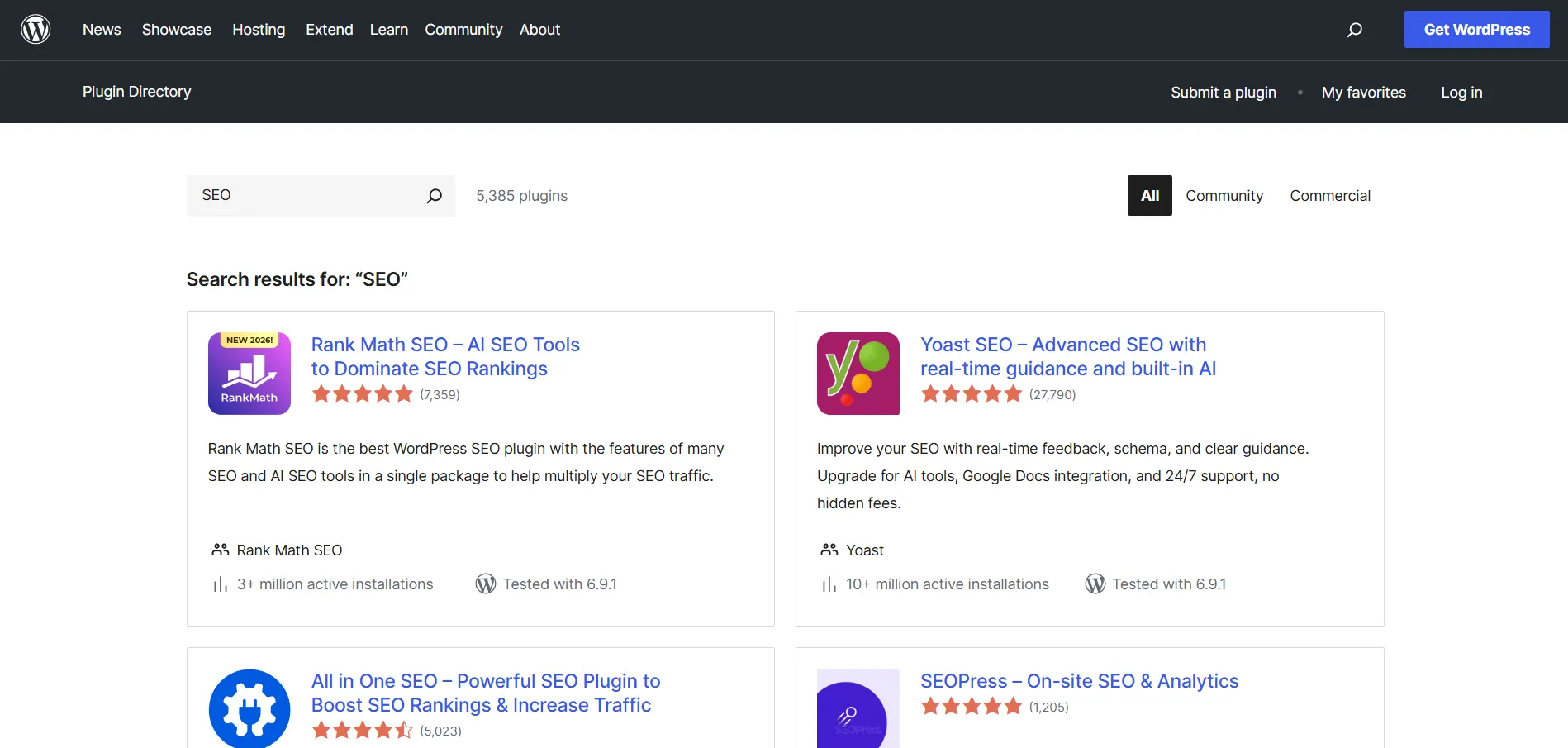
Yoast SEO is a beginner-friendly plugin that provides real-time content analysis, readability checks, meta tag editing, and automatic XML sitemap generation. It helps users optimize individual pages systematically while guiding them through core on-page improvements and structured data implementation.
Rank Math
Rank Math combines advanced functionality with ease of use. It supports multiple keyword optimization, automated SEO suggestions, built-in schema markup, and Search Console integration. Its modular structure allows users to activate only the features they truly need.
All in One SEO
All in One SEO offers comprehensive optimization features within a clean interface. It supports advanced sitemap management, schema integration, meta tag customization, and social media optimization. The plugin suits both beginners and experienced users seeking greater technical control.
W3 Total Cache
W3 Total Cache is a performance optimization plugin that improves load speed using page caching, browser caching, and content delivery network integration. Although it requires manual configuration, it can significantly enhance technical performance when properly set up.
SEOPress
SEOPress is a powerful all-in-one SEO plugin that allows full control over meta titles, descriptions, XML sitemaps, schema markup, and redirects. It includes content analysis, social preview customization, and Google Analytics integration, making it a strong alternative to larger SEO suites.
The SEO Framework
The SEO Framework is a lightweight plugin focused on automated optimization. It generates meta tags, canonical URLs, and structured data with minimal configuration. Designed for performance and simplicity, it appeals to users who prefer clean automation over feature-heavy dashboards.
Summary of WP SEO Strategies
Achieving strong rankings does not happen overnight, but implementing a structured approach to WordPress SEO can steadily improve your visibility and traffic over time. By focusing on keyword optimization, technical improvements, content strategy, and user experience, you create a solid foundation for sustainable growth.
This WordPress SEO guide has outlined beginner-friendly strategies, essential optimization techniques, and helpful tools to support your journey. As you apply these methods consistently, your website will become more search engine friendly, more user-focused, and more competitive in your niche. With patience, ongoing analysis, and refinement, your WordPress site can climb search rankings and deliver meaningful long-term results.