

Are your search engine rankings taking a hit? Don’t panic. This comprehensive guide will equip you with the knowledge and tools for effective SEO troubleshooting, helping you identify the root causes of common problems and get your website back on track and climbing the SERPs.
SEO issues often stem from a variety of factors including algorithm updates, technical mishaps, content misalignment, or weak link profiles. Left unresolved, these problems can lead to significant losses in visibility, traffic, and conversions. That’s why proactive troubleshooting is essential for maintaining a strong digital presence.
The goal of this guide is to help you think like an SEO detective. You will learn how to spot early symptoms, ask the right questions, use the appropriate tools, and apply fixes that make a measurable difference.
If some of the issues feel too complex or time-consuming, you can always consult a trusted SEO expert to get personalized support and expert intervention.
Let’s begin your troubleshooting journey by identifying the most common signs that something’s wrong with your site’s search performance.
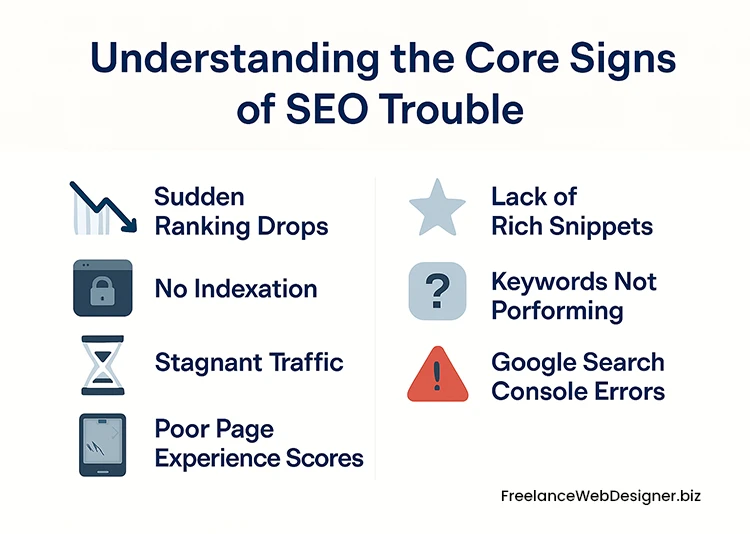
Understanding the Core Signs of SEO Trouble
Before diving into diagnosis and fixes, it is essential to recognize the early warning signs that your website might be experiencing SEO problems. These indicators often surface in performance metrics, user behavior, or visibility changes. Understanding them is the first step to effective SEO troubleshooting.
Below are the most common symptoms that suggest something is wrong with your website’s search performance:
1. Sudden Ranking Drops
If your rankings for previously stable keywords fall sharply, it is a clear red flag. This kind of drop often happens due to algorithm updates, manual penalties, lost backlinks, or significant changes to your site structure.
In some cases, it could even be caused by a competitor’s sudden improvement. Monitoring keyword performance regularly helps you catch these changes early and investigate before they impact your traffic further.
2. No Indexation
A page that is not indexed by Google will not appear in search results, regardless of how valuable or well-optimized the content is. No indexation could result from technical issues like incorrect use of robots.txt, noindex tags, or crawl errors.
It may also stem from duplicate content, canonical misconfigurations, or poor internal linking that isolates the page from crawlers. Using tools like Google Search Console and the “site:” search operator can help detect which pages are not indexed.
3. Stagnant Traffic
When your organic traffic remains flat despite consistent publishing or updates, it usually means your current efforts are not aligned with what search engines and users expect.
This stagnation can result from outdated content, missed keyword intent, declining link authority, or new competitors entering the scene. Analyzing your content’s freshness, performance data, and keyword alignment is essential for identifying areas that need improvement.
4. Poor Page Experience Scores
Google places increasing importance on user experience metrics, especially Core Web Vitals. Poor scores in loading speed, interactivity, and layout stability can hurt rankings and reduce user satisfaction.
If your site loads slowly, elements shift while loading, or the experience feels clunky, it is time to optimize your performance. Tools like PageSpeed Insights and the Core Web Vitals report in Search Console can help you pinpoint these issues.
5. Lack of Rich Snippets
Structured data, or schema markup, helps search engines understand your content better and display enhanced results such as ratings, FAQs, or event information.
If your site is missing rich snippets where they are expected, it may be due to incorrect or missing schema code. This issue not only reduces visual appeal in search results but may also affect click-through rates.
6. Keywords Not Performing
If your targeted keywords are failing to rank or driving little to no traffic, it may indicate problems with keyword intent, content depth, competition, or on-page optimization.
Sometimes, the content may not match what users are looking for, or competitors may be outranking you with more authoritative pages. A detailed keyword audit can uncover these misalignments and inform the necessary content adjustments.
7. Google Search Console Errors
Search Console is a vital tool for spotting SEO trouble. Issues flagged in the Coverage, Mobile Usability, Enhancements, or Manual Actions sections often point to deeper technical problems.
Whether it is crawl anomalies, indexing failures, or structured data errors, staying on top of these alerts ensures you can address issues before they escalate into traffic losses.
When Rankings Plummet: Diagnosing Sudden Drops
A sharp decline in search engine rankings can be alarming. Whether it affects a few key pages or your entire website, a sudden drop often signals a deeper issue that needs immediate attention. Understanding the possible causes and following a structured diagnostic approach is critical to regaining lost visibility.
Why Do Rankings Suddenly Drop?
There is rarely a single reason behind a ranking crash. Instead, it is usually a combination of factors. These may include:
- A recent algorithm update targeting content quality, link profiles, or page experience
- Technical issues such as broken redirects, incorrect canonical tags, or crawl errors
- Content changes that disrupt keyword alignment or reduce relevance
- Lost or toxic backlinks that affect domain authority
- Manual actions or penalties from violating webmaster guidelines
Sometimes, even changes on a competitor’s website can affect your position in search results, especially if they have improved their content or optimization.
Key Questions to Ask When Rankings Decline
To begin diagnosing the issue, consider the following questions:
- Did the drop coincide with a known Google algorithm update?
- Is the ranking loss isolated to specific pages, sections, or sitewide?
- Have there been recent changes to your website’s content, design, or structure?
- Are there any crawl errors or indexation issues flagged in Google Search Console?
- Has your backlink profile changed significantly in terms of quantity or quality?
- Are competitors now ranking above you with stronger or more relevant pages?
Answering these questions will help narrow down the root cause and guide your response. For more detailed solutions, explore Why Your Google Rankings Dropped: Diagnosing & Recovering from Algorithm Updates.
The Foundation First: Technical SEO Audit and Fixes
Before you optimize content or build backlinks, you must ensure your website’s technical foundation is solid. A well-executed technical audit helps uncover hidden issues that could block your site from reaching its full potential in search rankings. Technical SEO is not just about fixing errors. It is about creating an environment where search engines can access, understand, and prioritize your content.
Below are four key areas to focus on during your audit:
1. Is Google Even Seeing You? Indexing and Crawling Issues
If your content is not indexed, it does not exist in Google’s eyes. Crawling and indexing are the first steps in appearing on search results. When Google’s bots cannot access or understand your pages, your entire SEO effort is compromised.
Common Reasons for Non-Indexation:
- Noindex tags mistakenly placed on important pages
- Robots.txt rules that block crawling
- Broken internal links or redirect loops
- Orphaned pages with no internal pathways
- Poor server uptime or slow response times
- Sitemaps not submitted or outdated
Regularly monitor Google Search Console for index coverage reports and crawl stats to detect these issues early. For a deeper dive into diagnosing and fixing these errors, see My Website Isn’t Indexed: Troubleshooting Google Indexing & Crawling Problems.
2. Speed and User Experience: Core Web Vitals Deep Dive
Google considers page speed and overall user experience as ranking factors. Core Web Vitals measure how users interact with your pages and highlight areas for technical improvement.
There are three key Core Web Vitals:
- Largest Contentful Paint (LCP): Tracks how quickly the main content loads on the screen. Slow LCP often means delayed images or server issues.
- First Input Delay (FID): Measures how soon a page reacts when a user first clicks or taps. Delays usually happen due to heavy JavaScript blocking interaction.
- Cumulative Layout Shift (CLS): Captures how much elements move around as the page loads. A high CLS score signals visual instability, like buttons jumping unexpectedly.
Improving these metrics can boost user satisfaction and search visibility. Tools like PageSpeed Insights and Lighthouse provide valuable insights and recommendations. For a detailed breakdown of common issues and solutions, see Fixing Core Web Vitals Issues: Improving Page Experience for SEO.
3. Eliminating Redundancy: Resolving Duplicate Content
Duplicate content can confuse search engines and dilute ranking signals. It may not always trigger a penalty, but it can stop the right pages from getting indexed or ranked properly.
- HTTP vs. HTTPS / WWW vs. non-WWW: Different versions of your site can be indexed separately if not redirected correctly, creating unnecessary duplicates.
- Paginated pages and filtered URLs: Category pages with pagination or filters (e.g., ?color=blue) can generate multiple URLs with the same core content.
- Session IDs and tracking parameters: URLs with dynamic elements like session IDs or campaign tags (e.g., ?utm_source=) can be treated as separate pages.
- Copied product descriptions or articles: Reusing identical content across multiple pages or domains makes it harder for search engines to determine which version to rank.
Fix it with:
- Canonical tags: Tell search engines which version of a page is preferred.
- 301 redirects: Permanently point duplicate URLs to the correct one.
- Parameter handling: Use Google Search Console to control how parameters are indexed.
These steps help consolidate authority and improve indexing accuracy. For a deeper explanation of the problem and detailed solutions, see Resolving Duplicate Content Issues for Better SEO Performance.
4. Speaking Google’s Language: Fixing Schema Markup Errors
Schema Markup helps search engines interpret your content more clearly and unlocks the possibility of rich snippets, which can improve click-through rates. However, errors in structured data can cause those enhancements to disappear or be misrepresented.
Key Fixes:
- Use Schema.org vocabulary for correct markup types
- Validate your structured data using Google’s Rich Results Test and Schema Markup Validator
- Ensure the data matches what is visibly presented on the page
Avoid common mistakes like missing required properties or nesting markup incorrectly. Well-structured data builds trust and context for search engines.
For a detailed guide on identifying and fixing schema issues, see Resolving Schema Markup Errors: Enhancing Rich Snippets & Search Visibility.
On-Page Optimization: Content & Structure Matters
On-page elements directly affect how search engines interpret and rank your content. Even if your technical setup and backlinks are strong, issues with content quality, keyword targeting, or structural clarity can prevent your pages from reaching their full ranking potential.
1. The Content Itself: Fixing On-Page SEO Problems
Your content is the core of every page. But if it’s poorly structured or misaligned with user needs, rankings will suffer—even if other aspects are well-optimized.
Common on-page content issues include:
- Thin Content: Pages that contain very little meaningful or original information. These often provide only surface-level insights, making them less useful to both users and search engines.
- Keyword Stuffing: Overuse of target keywords in an unnatural way. This includes repeating phrases unnecessarily in titles, headers, and body content, which can trigger algorithmic penalties and reduce readability.
- Missing or Weak Meta Tags: Meta titles and descriptions that are either absent or poorly written. A weak title may not clearly convey the page topic, while a vague or generic description can lower click-through rates from search results.
- Improper Use of Headings: Misusing or skipping heading tags (like H1 or H2), leading to disorganized content structure. This makes it harder for search engines to understand hierarchy and for users to skim-read effectively.
- Low Content Quality: Content that is outdated, copied, grammatically poor, or lacks depth. It may fail to answer the user’s query fully, resulting in higher bounce rates and lower engagement.
Optimizing these areas ensures your content not only ranks but also keeps visitors engaged.
2. Are Your Keywords Working? Troubleshooting Keyword Performance
Even well-written pages can underperform if the keywords you target aren’t delivering results. To improve their effectiveness, assess whether you’re targeting the right terms—and in the right way.
Key issues to watch for:
- Search Intent Mismatch: When your page doesn’t align with what users actually want to find. For example, targeting a commercial keyword with an informational article, or vice versa.
- Overly Competitive Keywords: Targeting broad or high-volume phrases that are dominated by authoritative domains. Without enough topical authority or backlinks, your pages may struggle to break through.
- Lack of Content Depth: Pages that briefly mention a keyword topic but don’t go into enough detail. Users (and Google) expect comprehensive answers, not just surface-level coverage.
- Weak Internal Linking: When a page isn’t properly linked from other relevant pages within your site. This limits its authority and makes it harder for search engines to discover or prioritize.
- Crawl or Indexation Issues: Technical settings (like robots.txt or noindex tags) or sitemap problems can prevent search engines from crawling and indexing your pages, regardless of how well they’re optimized.
Addressing these gaps can breathe new life into underperforming content and boost your visibility for valuable search terms. For a detailed walkthrough on diagnosing and fixing these keyword performance issues, see Why Your Keywords Aren’t Ranking: Troubleshooting Keyword Performance Issues.
Off-Page Health: Link Profile & Authority
Off-page signals, especially backlinks, play a major role in determining a website’s authority and ranking potential. However, not all links are beneficial. A strong off-page profile includes high-quality, relevant links and excludes harmful or suspicious ones.
1. Dealing with Bad Neighbors: Diagnosing & Disavowing Toxic Backlinks
Not every backlink helps your site. Some can actively harm it. Toxic or spammy backlinks often come from irrelevant, low-quality, or manipulative sources. If your backlink profile includes too many of these, it can damage your rankings or even lead to manual penalties.
Key steps to identify and manage toxic backlinks:
Recognize What Makes a Link Toxic
Links from sites that are part of link schemes, contain malware, or exist solely to manipulate search rankings can be considered toxic. These often come from:
- Irrelevant directories or blog networks
- Hacked or penalized websites
- Automatically generated pages or comment spam
Use Backlink Auditing Tools
Tools like Google Search Console, Ahrefs, or SEMrush can help uncover suspicious links by assessing domain authority, relevance, anchor text usage, and more.
Check for Link Patterns
Multiple links with identical anchor text from unrelated domains, sudden spikes in referring domains, or links from foreign-language spam sites are red flags.
Use the Disavow Tool When Necessary
If manual removal of links is not possible, Google’s Disavow Tool allows you to tell the search engine to ignore specific backlinks. This should be a last resort and used only when you’re sure the links are harming your profile.
Monitor Your Backlink Profile Regularly
Link profiles are dynamic. Regular reviews help ensure that new toxic links are detected early and managed before they affect performance.
For a detailed guide, explore Diagnosing & Disavowing Toxic Backlinks: Cleaning Up Your Link Profile.
Specific Scenarios: Local SEO & Traffic Stagnation
Some SEO challenges stem from specific goals or contexts that fall outside general technical or on-page issues. Local visibility and traffic stagnation are two such scenarios that require dedicated diagnosis methods. Below, we break down each with actionable subtopics.
1. Getting Found Locally: Troubleshooting Local SEO Ranking Issues
Businesses targeting local audiences face particular hurdles, including high competition, regional targeting complexities, and inconsistent online listings. This section highlights core areas to evaluate when your business fails to appear in local search results.
Verifying Your Google Business Profile
Your presence on Google Business Profile (GBP) is often the gateway to appearing in the local 3-pack or Maps results. Ensure the profile is claimed, verified, and fully populated with accurate information, including service categories, hours, and images. Misconfigured listings or incomplete data can prevent your business from surfacing.
Ensuring NAP Consistency
Google relies heavily on NAP (Name, Address, Phone Number) consistency to confirm your business’s legitimacy. Check all your citations across business directories, review sites, and social platforms. Even minor differences in formatting or outdated phone numbers can dilute trust and harm rankings.
Building Local Authority Through Reviews & Backlinks
Beyond basic setup, Google rewards local trust signals. Encourage customer reviews, respond to them, and build local backlinks from community websites, local press, and chambers of commerce. These support your relevance for geo-specific searches.
If local reach remains a challenge, our local digital marketing solutions are built specifically for SMBs to enhance discoverability. You can also explore our detailed guide on Troubleshooting Local SEO Ranking Issues for Businesses: Getting Found Locally for step-by-step solutions to improve local search visibility.
2. Reviving Your Traffic: Diagnosing & Boosting Organic Traffic Growth
If your rankings remain unchanged but organic traffic has slowed or flatlined, it may be due to algorithmic shifts, outdated content, or changing user intent. Here’s how to identify and respond to this traffic stagnation.
1. Recognizing the Signs of Plateaued Traffic
Use Google Search Console and Analytics to detect declining impressions, reduced CTR, or flat sessions over time. Segment by page and keyword to identify where drop-offs are occurring.
2. Auditing and Refreshing Outdated Content
Stagnation often results from content that no longer aligns with current searcher needs. Conduct a content audit to find underperforming pages and refresh them by:
- Updating stats or examples
- Improving structure for readability
- Aligning with current intent and queries
3. Expanding Content Coverage and Fixing Technical Blocks
You may also need to add new, intent-aligned content to meet evolving demand. Simultaneously, investigate technical issues such as poor crawlability, duplicate metadata, or slow performance, which can affect traffic even when rankings look stable.
To dive deeper into diagnosing and fixing these challenges, check out My Website Traffic is Stagnant: Diagnosing & Boosting Organic Traffic Growth.
Ongoing Monitoring & Prevention: Tools and Best Practices
Troubleshooting website ranking issues doesn’t stop once the immediate problems are resolved. Long-term visibility depends on constant monitoring, early detection, and preventive action.
This section introduces some of the most effective tools available for ongoing observation, followed by essential practices that support lasting performance in search results.
Essential Tools for Continuous SEO Monitoring
Leverage these tools to keep track of your website’s health, performance, and compliance with evolving search engine requirements.
1. Google Search Console
Helps monitor how your site appears in search results, track indexing issues, search visibility, and mobile usability.
2. Google Analytics
Provides insights into user behavior, traffic sources, session duration, and conversion tracking.
3. SEMrush
A robust SEO platform offering keyword tracking, site audits, backlink analysis, and competitive insights.
4. Ahrefs
Specializes in backlink analysis and domain strength evaluation, with strong tools for competitor research.
5. Ubersuggest
Offers keyword suggestions, site audits, traffic estimates, and beginner-friendly SEO insights.
6. Moz Pro
Combines keyword tracking, site health analysis, domain authority monitoring, and backlink data.
7. Screaming Frog
A desktop crawler that identifies broken links, missing metadata, redirect issues, and crawl errors.
8. Sitebulb
Visualizes technical audit results, focusing on crawlability, internal structure, and on-page quality.
9. PageSpeed Insights
Evaluates loading performance and Core Web Vitals for mobile and desktop, offering improvement suggestions.
10. GTmetrix
Provides a detailed breakdown of page load time, waterfall charts, and performance scores with historical tracking.
Best Practices for Preventing Future SEO Issues
The following best practices ensure your site remains optimized and resilient against algorithm changes or technical disruptions.
Regular SEO Audits
Perform thorough site audits at scheduled intervals to identify and fix issues such as crawl errors, broken links, poor metadata, and technical gaps before they affect rankings.
Staying Updated with Algorithm Changes
Keep track of core updates and other algorithmic shifts from search engines. Adjust your optimization efforts in response to verified changes that impact indexing or ranking factors.
Content Quality Control
Review content across your website regularly to ensure accuracy, relevance, and originality. Weed out low-performing or outdated pages, and maintain a high standard of value for users.
Proactive Link Building
Focus on acquiring relevant, high-quality backlinks through outreach, guest publishing, and partnerships. Avoid manipulative tactics that can result in penalties.
Conclusion: Your Path to SEO Recovery
SEO problems can be complex, but they are never unsolvable. With a systematic approach to identifying symptoms, analyzing root causes, and applying targeted solutions, your website can recover and grow stronger.
Whether it’s a sudden ranking drop, indexing issue, content gap, or backlink toxicity, each problem has a diagnosis and a fix.
Need help fixing your technical SEO issues or boosting keyword performance? Contact us for a personalized audit and expert support.